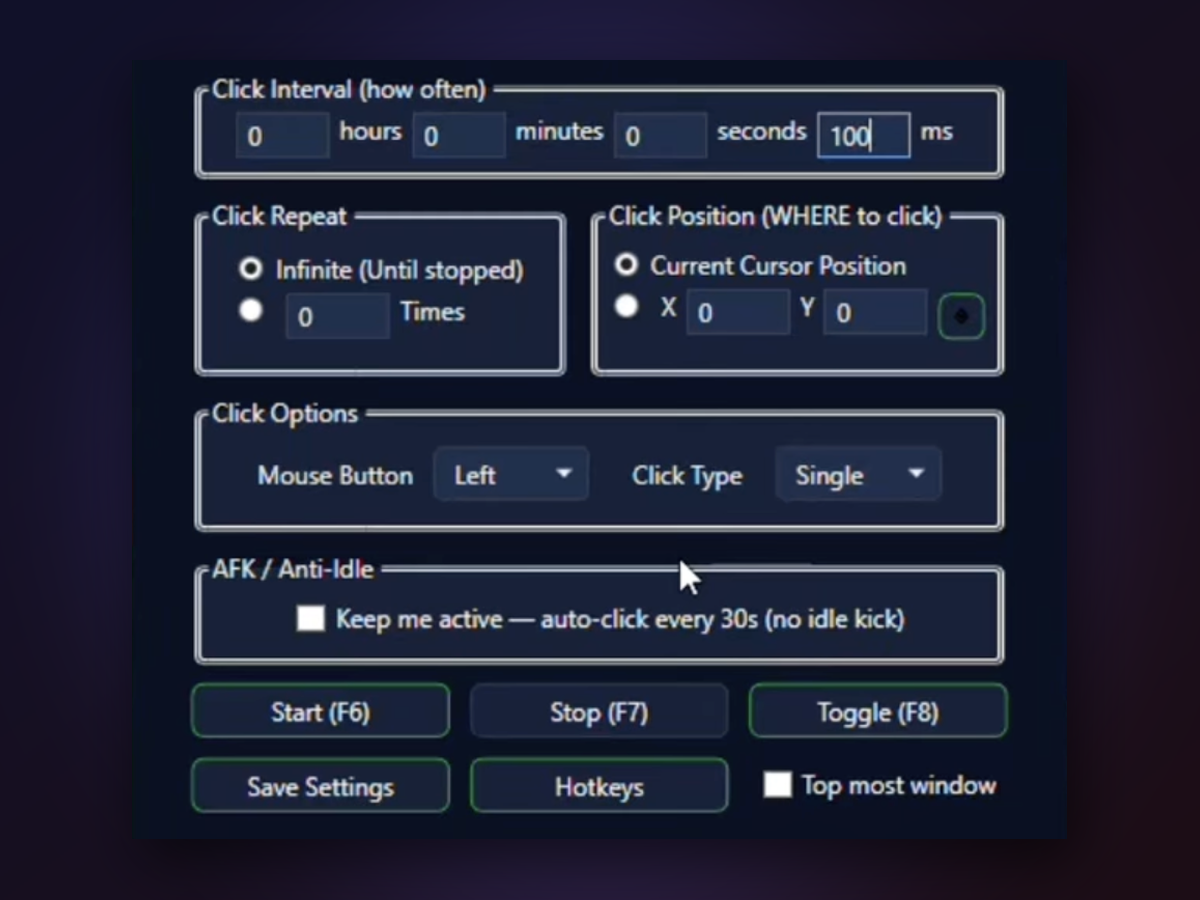
Set up clicking in seconds — pick your speed, choose where to click, press F6 to start. Works in any Windows game or app, even when your window isn't focused. No ads, no accounts, just a single executable file you download and run.

Auto Clicker Open delivers consistent clicking at any interval you set — from leisurely taps to rapid-fire sequences. The coordinate picker lets you nail the exact spot, and global hotkeys mean you stay in control without tabbing out.
You get a lightweight tool that respects your time and your system.
One .exe file under 1 MB, zero dependencies, zero installation. Download, extract, run — that's your entire setup. Open-source code means you see exactly what it does.
Global hotkeys work while your game has focus, so you never need to alt-tab to control the clicker. AFK mode can send a gentle click every 30 seconds to keep you from being idle-kicked.
Adjust click speed in real time, choose any mouse button and click type, set a repeat limit or click forever. No presets, no guessing.
Pin it to your screen or hide it in the system tray. Always-on-top mode keeps it visible without stealing focus from your game.
Most people are up and running in under a minute.
Side by side with what most people find online.
| Auto Clicker Open | Typical online auto clicker | |
|---|---|---|
| File size | Under 1 MB | 5–50 MB or more |
| Installation | None — portable .exe | Setup wizard or installer |
| Source code | Fully open-source | Closed or hidden |
| Global hotkeys | Built-in (F6/F7/F8) | Often limited or absent |
| Offline use | Works completely offline | May require internet or account |
| Cost | Free, always | Free trial then paywall |
Auto Clicker Open is a tool; how you use it is up to you. Some games detect automation. Always check a game's terms of service before using any clicker. We can't be responsible for account actions.
Auto Clicker Open clicks the mouse — left, right, or middle button. It doesn't send keyboard key presses.
The current version clicks one location repeatedly. If you need multi-point sequences, you can run multiple instances or script custom behavior.
You can set intervals as low as 1 millisecond, which theoretically reaches 1000 CPS. Actual speed depends on your hardware and Windows load.
No. The .exe is fully self-contained. If you're on Windows 10 or 11, it runs immediately.
Press F7 to stop, or F8 to toggle on and off. You can also click the Stop button in the window.
Yes. Minimize it, hide it in the system tray, or use Always-on-Top mode — global hotkeys keep working either way.
Download Auto Clicker Open now and spend less time on repetitive clicks.
Download for Windows